
stop staring at data. start connecting it instead.

Dear Data Analyst,
Here’s what nobody tells you about Excel.
Your data is useless when it lives in tabs.
You have sales data in one tab. Employee names in another.
You are manually switching back and forth to match thins up.
That’s not analysis.
That’s a waste of your time.
This is why you need the VLOOKUP function.
What is VLOOKUP
It is:
The function that connects separate datasets
The function interviewers ask about most
The function that separates beginners from analysts
What does the VLOOKUP do
It searches for a value in one table and returns matching information from another.
Instead of manually matching rows between two tabs.
You let Excel do the work.
Here’s how it works:
When you type this into any cell: =VLOOKUP(A2, Sheet2!A:D, 2, FALSE)
This tells Excel: “Take the value in A2, find it in the first column of Sheet2, and bring back whatever’s in the 2nd column.”
That’s it.
One formula.
One connection.
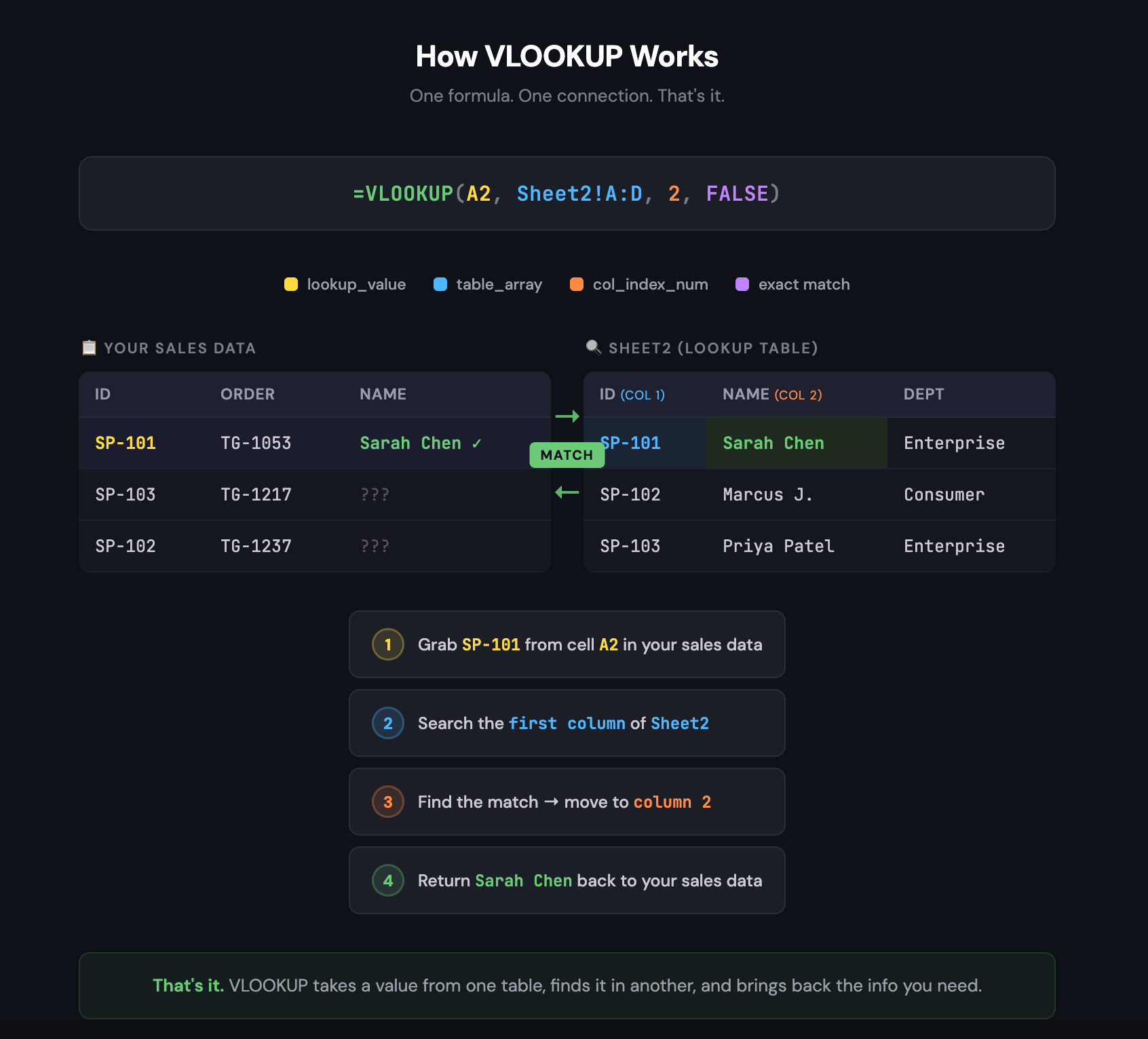
Let’s break down the 4 parts:
=VLOOKUP(lookup_value, table_array, col_index_num, FALSE)
lookup_value = The value you’re searching for
table_array = Where to search (your reference table)
col_index_num = Which column to return (2nd, 3rd, 4th, etc.)
FALSE = Exact match only (always use FALSE)
Think of it like this.
You have a salesperson ID: SP-101.
You don’t know who SP-101 is.
VLOOKUP goes to your lookup table
Finds SP-101
Comes back with “Sarah Chen.”
That’s the whole function.
Real examples you’ll actually use:
Matching employee IDs to names:
Your sales data has “SP-101” but your boss wants names.
VLOOKUP pulls “Sarah Chen” from your employee table.
Pulling product prices into order data:
Order sheet has product codes. Price sheet has prices.
VLOOKUP connects them in seconds.
Adding department info to transaction records:
You need to know which department generated each sale.
VLOOKUP grabs it from your HR table.
Why this matters for your career:
VLOOKUP is the one of the most basic Excel function in interviews.
A hiring manager says “How would you combine data from two sources?”
They’re testing you.
They want to know if you can connect information across datasets.
SUM
COUNT
AVERAGE work on one table.
VLOOKUP works across tables.
Learn the VLOOKUP to start working like a data analyst.
YOUR 1-MINUTE PRACTICE PROJECT
Let’s match salesperson IDs to their names:
Step 1: Open Excel or Google Sheets right now.
Step 2: Create your lookup table first.
In cell D1, type “ID”. In cell E1, type “Name”.
D2: SP-101 | E2: Sarah Chen
D3: SP-102 | E3: Marcus Johnson
D4: SP-103 | E4: Priya Patel
Step 3: Now create your sales data.
In cell A1, type “Order”. In cell B1, type “Salesperson_ID”. In cell C1, type “Salesperson_Name”.
A2: Order-001 | B2: SP-103
A3: Order-002 | B3: SP-101
A4: Order-003 | B4: SP-102
A5: Order-004 | B5: SP-101
Step 4: In cell C2, type: =VLOOKUP(B2, $D$2:$E$4, 2, FALSE)
Step 5: Press Enter.
You just pulled “Priya Patel” from a completely different table.
Now drag the formula down from C2 to C5.
Watch every salesperson ID get matched to a name instantly.
This is the power of VLOOKUP.
It connects your data.
BONUS: Handle errors like a pro.
What if someone types “SP-999” and it doesn’t exist in your lookup table?
VLOOKUP throws an ugly #N/A error.
Fix it with IFERROR:
=IFERROR(VLOOKUP(B2, $D$2:$E$4, 2, FALSE), "Not Found")
Now instead of #N/A, you get “Not Found.”
Clean data.
Professional output.
That’s analyst-level thinking.
The 3 mistakes that trip everyone up:
Mistake 1: Forgetting the dollar signs (D$2: E$4).
Without them, your table reference shifts when you drag the formula down. Everything breaks.
Mistake 2: Wrong column number.
If your table has 3 columns and you type 4, you get an error.
Count your columns carefully.
Mistake 3: Using TRUE instead of FALSE.
TRUE gives you approximate matches. You almost never want that.
Always use FALSE for exact matches.
Here’s what you’ve learned in the last 4 letters:
Week 1: SUM gives you totals.
Week 2: AVERAGE gives you benchmarks.
Week 3: COUNT gives you volume.
Week 4: VLOOKUP connects your data.
Together, they answer the questions hiring managers actually ask:
“What’s our total revenue?” → SUM
“What’s our average order value?” → AVERAGE
“How many customers did we lose?” → COUNT
“Which salesperson closed this deal?” → VLOOKUP
Next week, I’ll teach you Pivot Tables - The skill that makes hiring managers say “Yes”
It’s the function that turns raw data into interactive dashboards.
Keep building. Keep learning.
You’ve got this.
Stanley
This is such a clean explanation. As someone building a career in data analytics, I’ve seen how often functions like VLOOKUP are underestimated. Simple tools, huge time savings. Thanks for making it easy to understand.